
1. Get the registered name or code
Ask your supplier for its business license and copy the Chinese name shown beside 名称. If the license has an 18-character 统一社会信用代码, copy that code too. A shop name or English trading name may identify a brand rather than the entity you will contract with.
- Keep the full Chinese name, including its company suffix.
- Check copied text for missing characters and spaces introduced by a PDF.
- If you only have an English name, ask the supplier for the matching Chinese registered name and code.
The search preparation assistant can help you organize this input. It does not find or return company records.
2. Open the official portal and search
Open the official GSXT portal. A security check runs for a moment as the page first loads; it needs JavaScript and cookies and passes on its own in a normal browser. The homepage search box accepts a company name, a USCC or an older registration number (its placeholder reads 请输入企业名称、统一社会信用代码或注册号). Paste your identifier and press 查询 (search).

- Search tabs. Leave it on 企业信用信息 (company credit information); the other two search the abnormal operations list and the serious violations list.
- Search box. Paste the Chinese registered name, the 18-character USCC or an older registration number.
- 查询: search.
- 热搜榜: the most-searched companies right now. You can ignore it.
gsxt.gov.cn homepage, 20 October 2026. Cropped.
A GEETEST puzzle then appears. 请在下图依次点击 means “click in the picture below, in order”: the prompt shows a few small icons or characters, and you click each one where it appears in the picture, in the same order. You can match them by shape without reading Chinese; then press 确定 (confirm). Expect a new puzzle for each search.
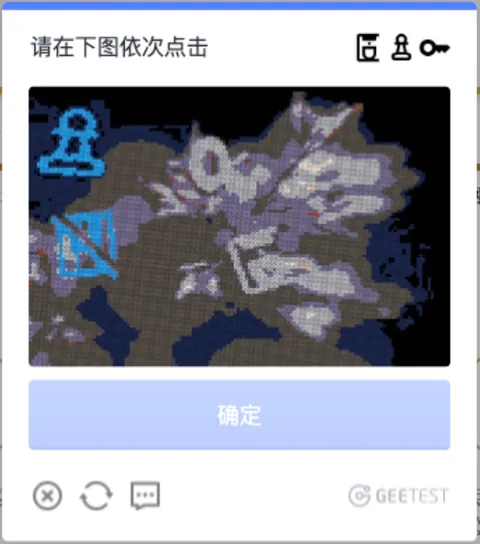
- The icons (sometimes characters) to click, in this order.
- Find each one in the picture and click it, in the same order. Here the pawn and the crossed square are visible.
- 确定: confirm.
- Load a different puzzle if this one is hard to make out.
The puzzle appears after every search. gsxt.gov.cn, 20 October 2026.
Results list each match with its full Chinese name, registration status, USCC, legal representative and establishment date. Name searches match keywords and show at most 100 results, so use the full name or the USCC when you can. Opening a result shows the company record in a new tab.
The portal also has provincial sub-sites, such as bj.gsxt.gov.cn for Beijing and sh.gsxt.gov.cn for Shanghai, reached from its 导航 (navigation) menu. Some local notices only appear there.
GSXT is the portal address for 国家企业信用信息公示系统. NECIPS is an English abbreviation for the same system; these are not two separate company databases.
3. Match the legal entity before reading further
Without an account, the record shows the business license details (营业执照信息): name, USCC, legal representative, type, establishment date, registered capital, registration authority, status, address and business scope. The page ends with 请登录后查看更多信息, “log in to see more information”. Administrative licenses, penalties, annual reports and the other sections need a real-name account at shiming.gsxt.gov.cn, whose login form asks for a mobile phone number or ID card number.
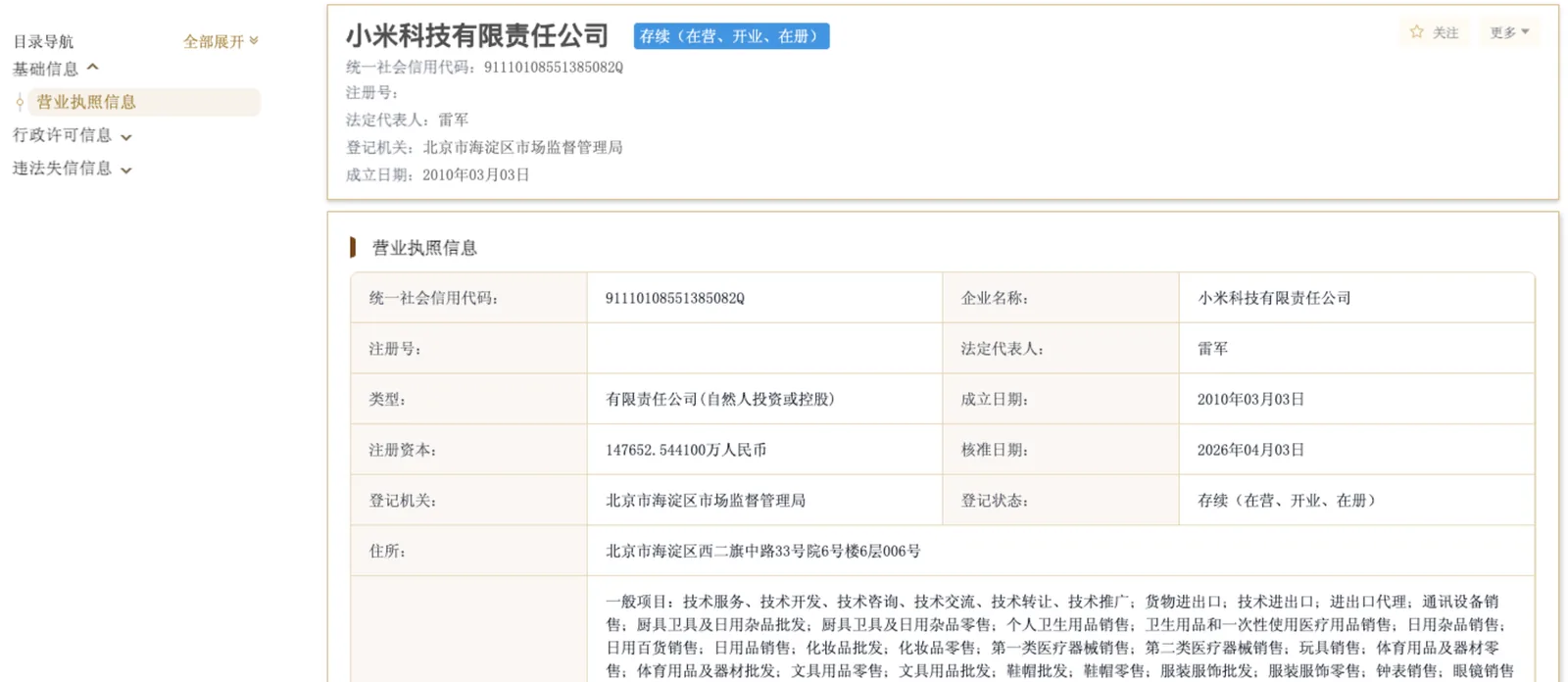
- Registration status. 存续(在营、开业、在册)means the company exists and is operating.
- Sections. Without an account you can read 营业执照信息 (business license details); the other sections need a login.
- 统一社会信用代码: match all 18 characters with the business license.
- 法定代表人: the legal representative.
- 注册资本: registered capital, in 万 (units of 10,000) yuan. 147652.5441万 is about 1.48 billion yuan, subscribed rather than necessarily paid in.
- 住所: the registered address, which may not be the factory.
- 经营范围: business scope. Check that it covers the goods you are buying.
A company record on gsxt.gov.cn, viewed without logging in on 20 October 2026. Cropped; select the image to open it at full size.
When you open a result, compare its Chinese name and USCC with the license, quotation, and draft contract. Check the displayed registration status and address. Similar names alone are not enough to establish a match.
Read the English guide to Chinese registry fields for terms such as 注册资本 and 法定代表人. Keep the original Chinese labels beside any translations in your own notes.
If several results look plausible, ask the supplier to resolve the mismatch. A failed search is a reason to check the identifier and access conditions, rather than a conclusion that the company is fraudulent.
4. Save the source and date of your check
Record when you checked, the official page address, the entity identifier, and the entries relevant to your order. Distinguish registration information from company-submitted annual reports, and note the reporting year or date attached to each entry.
Use those findings with your supplier verification checklist. A matching registration record does not establish product quality, control of a bank account, or authority to sign your contract.
FAQ
Common questions
Can I search GSXT using only an English company name?
Start with the Chinese registered name or USCC from the business license. An English name may be a translation or trading name, and this site does not map it to an official record.
Is there a captcha on GSXT?
Yes, on every search. A GEETEST puzzle asks you to click the icons or characters shown in its prompt, in order, in a picture. You can match them by shape without reading Chinese.
Do I need an account to use GSXT?
Not to search or to see the business license details. Licenses, penalties, annual reports and the rest of the record need a real-name account, whose login asks for a mobile phone number or ID card number. We could not confirm whether foreign phone numbers or passports are accepted.
Does this site log in to GSXT for me?
No. You open the official portal and follow its access instructions yourself. This site does not handle government-portal accounts or bypass verification.
What should I do if the official portal does not load?
Use a normal browser with JavaScript and cookies enabled, and try again later; heavy demand can slow the portal. Check the exact name or code with your supplier. A network or access error does not tell you whether a company exists.
Next step
Have a company to check?
Start with the name or code your supplier gave you.